Why “Remember me” does not work? |ทำไมระบบช่วยจำชื่อผู้ใช้และรหัสผ่านจึงไม่ทำงาน
1. How do you enable cookies on device? |ตรวจสอบว่าอุปกรณ์ที่ใช้งาน Enable cookies อยู่
Method of Enable Cookies for the devices|วิธีการ Enable cookies บนอุปกรณ์ต่างๆ
Method of Enable Cookies for the devices|วิธีการ Enable cookies บนอุปกรณ์ต่างๆ
 Apple iOS
- From the Home screen > Settings icon > Safari > Privacy > Accept Cookies > select “From visited”
- จากหน้าจอหลัก เลือกไอคอน Settings > Safari > Privacy > Accept Cookies เลือก “From visited”
-
Android
- Open Browser > Settings > Privacy and Security > Mark “Accept Cookies” button
- เปิดเบราว์เซอร์ เลือก Settings > Privacy and Security คลิก “Accept Cookies” button
-
Windows
- Windows >> Open Browser > Tools > Internet Options > Privacy > Settings > move the slider to the bottom to allow all cookies, and then click OK.
- Windows >> เปิดเบราว์เซอร์ > Tools > Internet Options > Privacy > Settings เลื่อนสไลด์บาร์ไปที่ข้างล่างเพื่อเปิดคุ้กกี้ > ตกลง
- Google Chrome >> Open Browser > Settings > Show advanced settings > Privacy > Content settings > select Allow local data to be set (recommended)
- Google Chrome >> เปิดเบราว์เซอร์ > Settings > คลิก Show advanced settings > Privacy > Content settings > เลือก select Allow local data to be set (recommended)
- Firefox >> Open Browser > Tools > Options > Privacy > Set Firefox will : to Use custom settings for history > Mark “Accept cookies" from sites
- Firefox >> เปิดเบราว์เซอร์ > Tools > Options > Privacy เมนู Set Firefox will : to Use custom settings for history > คลิก “Accept cookies" from sites
-
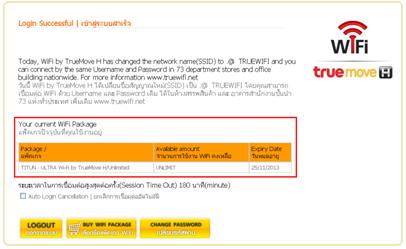
Unlimited WiFi Package: will logon to the system automatically |
กรณีแพ็คเกจ WiFi แบบไม่จำกัดชั่วโมงการใช้งาน : จะสามารถเข้าสู่ระบบได้โดยอัตโนมัติ -
Remark|หมายเหตุ
For Unlimited WiFi Package Usage: In case of the customers that have not yet recorded the MAC Address into the system, please contact Call Center 1331 or True Shop |
สำหรับแพ็คเกจ WiFi ไม่จำกัดชั่วโมงการใช้งาน แบบเข้าสู่ระบบอินเทอร์เน็ตด้วยการจดจำ Mac Addressโดยอัตโนมัติ จะไม่พบหน้าจอ Login ดังกล่าว ทั้งนี้ลูกค้าที่ใช้แพ็คเกจ WiFi แบบจดจำ Mac Address ที่ยังไม่ได้รับการบันทึกค่า Mac Address ของอุปกรณ์ลงในระบบ สามารถติดต่อได้ที่ Call Center โทร. 1331 หรือ ทรูช้อป ทุกสาขา -
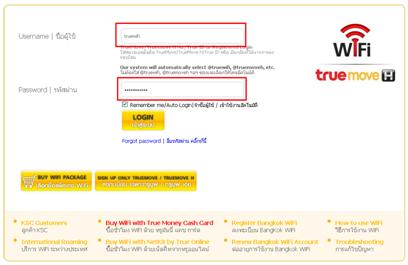
In case of limited wifi package usage, the system will show username password then press login then the customer can connect to internet normally |
กรณีแพ็กเกจ WiFi แบบจำกัดชั่วโมงการใช้งาน: ระบบจะแสดงชื่อผู้ใช้งาน และรหัสผ่านให้ เพียงลูกค้าคลิกปุ่ม “เข้าสู่ระบบ” ก็จะสามารถเชื่อมต่ออินเทอร์เน็ตได้ตามปกติ
2. Your Package Check |ตรวจสอบแพ็คเกจการใช้งาน
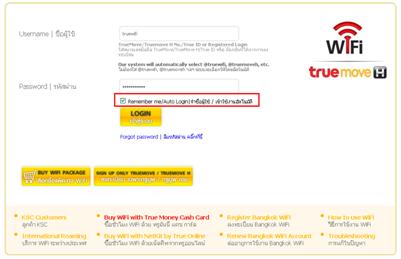
After you click “Remember Me/Auto Login” .@ TRUEWIFI , you will be able to connect the internet according to your package as followings: |
หลังจากคลิกปุ่ม Remember me/Auto Login| จำชื่อผู้ใช้ / เข้าใช้งานอัตโนมัติ ในการใช้งานครั้งต่อไป หลังจากเชื่อมต่อเครือข่าย . @TRUEWIFI แล้ว คุณจะสามารถเข้าสู่ระบบอินเทอร์เน็ตตามประเภทแพ็คเกจที่ใช้บริการดังนี้